
Sau khi tập 5 bộ phim Thắp Sáng Anh, Sưởi Ấm Em phát sóng, một trào lưu mới đã nổi ầm ầm trên khắp các trang mạng xã hội sau phân cảnh Lý Tuân (Trần Phi Vũ) vẽ trái tim hồng cho Chu Vận (Trương Tịnh Nghi) bằng mã code.
Nếu bạn đang muốn tìm code trái tim C++ của thủ khoa Lý thì có thể tham khảo các bước thực hiện bên dưới của GameVui.
Cách thực hiện code trái tim của thủ khoa Lý
Tải code trái tim đập html
Bước 1: Trước tiên, bạn hãy lưu lại đoạn code trái tim đập dưới đây về máy tính của mình bằng Notepad
<!DOCTYPE HTML PUBLIC “-//W3C//DTD HTML 4.0 Transitional//EN”> <HTML> <HEAD> <meta charset=”utf-8″ /> <TITLE> Code trái tim đập GameVui </TITLE> <META NAME=”Generator” CONTENT=”EditPlus”> <META NAME=”Author” CONTENT=””> <META NAME=”Keywords” CONTENT=””> <META NAME=”Description” CONTENT=””> <style> html, body { height: 100%; padding: 0; margin: 0; background: #000; display: flex; justify-content: center; align-items: center; } .box { width: 100%; position: absolute; top: 50%; left: 50%; transform: translate(-50%, -50%); display: flex; flex-direction: column; } canvas { position: absolute; width: 100%; height: 100%; } #pinkboard { position: relative; margin: auto; height: 500px; width: 500px; animation: animate 1.3s infinite; } #pinkboard:before, #pinkboard:after { content: ”; position: absolute; background: #FF5CA4; width: 100px; height: 160px; border-top-left-radius: 50px; border-top-right-radius: 50px; } #pinkboard:before { left: 100px; transform: rotate(-45deg); transform-origin: 0 100%; box-shadow: 0 14px 28px rgba(0,0,0,0.25), 0 10px 10px rgba(0,0,0,0.22); } #pinkboard:after { left: 0; transform: rotate(45deg); transform-origin: 100% 100%; } @keyframes animate { 0% { transform: scale(1); } 30% { transform: scale(.8); } 60% { transform: scale(1.2); } 100% { transform: scale(1); } } </style> </HEAD> <BODY> <div class=”box”> <canvas id=”pinkboard”></canvas> </div> <script> /* * Settings */ var settings = { particles: { length: 2000, // maximum amount of particles duration: 2, // particle duration in sec velocity: 100, // particle velocity in pixels/sec effect: -1.3, // play with this for a nice effect size: 13, // particle size in pixels }, }; /* * RequestAnimationFrame polyfill by Erik Möller */ (function(){var b=0;var c=[“ms”,”moz”,”webkit”,”o”];for(var a=0;a<c.length&&!window.requestAnimationFrame;++a){window.requestAnimationFrame=window[c[a]+”RequestAnimationFrame”];window.cancelAnimationFrame=window[c[a]+”CancelAnimationFrame”]||window[c[a]+”CancelRequestAnimationFrame”]}if(!window.requestAnimationFrame){window.requestAnimationFrame=function(h,e){var d=new Date().getTime();var f=Math.max(0,16-(d-b));var g=window.setTimeout(function(){h(d+f)},f);b=d+f;return g}}if(!window.cancelAnimationFrame){window.cancelAnimationFrame=function(d){clearTimeout(d)}}}()); /* * Point class */ var Point = (function() { function Point(x, y) { this.x = (typeof x !== ‘undefined’) ? x : 0; this.y = (typeof y !== ‘undefined’) ? y : 0; } Point.prototype.clone = function() { return new Point(this.x, this.y); }; Point.prototype.length = function(length) { if (typeof length == ‘undefined’) return Math.sqrt(this.x * this.x + this.y * this.y); this.normalize(); this.x *= length; this.y *= length; return this; }; Point.prototype.normalize = function() { var length = this.length(); this.x /= length; this.y /= length; return this; }; return Point; })(); /* * Particle class */ var Particle = (function() { function Particle() { this.position = new Point(); this.velocity = new Point(); this.acceleration = new Point(); this.age = 0; } Particle.prototype.initialize = function(x, y, dx, dy) { this.position.x = x; this.position.y = y; this.velocity.x = dx; this.velocity.y = dy; this.acceleration.x = dx * settings.particles.effect; this.acceleration.y = dy * settings.particles.effect; this.age = 0; }; Particle.prototype.update = function(deltaTime) { this.position.x += this.velocity.x * deltaTime; this.position.y += this.velocity.y * deltaTime; this.velocity.x += this.acceleration.x * deltaTime; this.velocity.y += this.acceleration.y * deltaTime; this.age += deltaTime; }; Particle.prototype.draw = function(context, image) { function ease(t) { return (-t) * t * t + 1; } var size = image.width * ease(this.age / settings.particles.duration); context.globalAlpha = 1 – this.age / settings.particles.duration; context.drawImage(image, this.position.x – size / 2, this.position.y – size / 2, size, size); }; return Particle; })(); /* * ParticlePool class */ var ParticlePool = (function() { var particles, firstActive = 0, firstFree = 0, duration = settings.particles.duration; function ParticlePool(length) { // create and populate particle pool particles = new Array(length); for (var i = 0; i < particles.length; i++) particles[i] = new Particle(); } ParticlePool.prototype.add = function(x, y, dx, dy) { particles[firstFree].initialize(x, y, dx, dy); // handle circular queue firstFree++; if (firstFree == particles.length) firstFree = 0; if (firstActive == firstFree ) firstActive++; if (firstActive == particles.length) firstActive = 0; }; ParticlePool.prototype.update = function(deltaTime) { var i; // update active particles if (firstActive < firstFree) { for (i = firstActive; i < firstFree; i++) particles[i].update(deltaTime); } if (firstFree < firstActive) { for (i = firstActive; i < particles.length; i++) particles[i].update(deltaTime); for (i = 0; i < firstFree; i++) particles[i].update(deltaTime); } // remove inactive particles while (particles[firstActive].age >= duration && firstActive != firstFree) { firstActive++; if (firstActive == particles.length) firstActive = 0; } }; ParticlePool.prototype.draw = function(context, image) { // draw active particles if (firstActive < firstFree) { for (i = firstActive; i < firstFree; i++) particles[i].draw(context, image); } if (firstFree < firstActive) { for (i = firstActive; i < particles.length; i++) particles[i].draw(context, image); for (i = 0; i < firstFree; i++) particles[i].draw(context, image); } }; return ParticlePool; })(); /* * Putting it all together */ (function(canvas) { var context = canvas.getContext(‘2d’), particles = new ParticlePool(settings.particles.length), particleRate = settings.particles.length / settings.particles.duration, // particles/sec time; // get point on heart with -PI <= t <= PI function pointOnHeart(t) { return new Point( 160 * Math.pow(Math.sin(t), 3), 130 * Math.cos(t) – 50 * Math.cos(2 * t) – 20 * Math.cos(3 * t) – 10 * Math.cos(4 * t) + 25 ); } // creating the particle image using a dummy canvas var image = (function() { var canvas = document.createElement(‘canvas’), context = canvas.getContext(‘2d’); canvas.width = settings.particles.size; canvas.height = settings.particles.size; // helper function to create the path function to(t) { var point = pointOnHeart(t); point.x = settings.particles.size / 2 + point.x * settings.particles.size / 350; point.y = settings.particles.size / 2 – point.y * settings.particles.size / 350; return point; } // create the path context.beginPath(); var t = -Math.PI; var point = to(t); context.moveTo(point.x, point.y); while (t < Math.PI) { t += 0.01; // baby steps! point = to(t); context.lineTo(point.x, point.y); } context.closePath(); // create the fill context.fillStyle = ‘#FF5CA4’; context.fill(); // create the image var image = new Image(); image.src = canvas.toDataURL(); return image; })(); // render that thing! function render() { // next animation frame requestAnimationFrame(render); // update time var newTime = new Date().getTime() / 1000, deltaTime = newTime – (time || newTime); time = newTime; // clear canvas context.clearRect(0, 0, canvas.width, canvas.height); // create new particles var amount = particleRate * deltaTime; for (var i = 0; i < amount; i++) { var pos = pointOnHeart(Math.PI – 2 * Math.PI * Math.random()); var dir = pos.clone().length(settings.particles.velocity); particles.add(canvas.width / 2 + pos.x, canvas.height / 2 – pos.y, dir.x, -dir.y); } // update and draw particles particles.update(deltaTime); particles.draw(context, image); } // handle (re-)sizing of the canvas function onResize() { canvas.width = canvas.clientWidth; canvas.height = canvas.clientHeight; } window.onresize = onResize; // delay rendering bootstrap setTimeout(function() { onResize(); render(); }, 10); })(document.getElementById(‘pinkboard’)); </script> <div class=”center-text”, style=”background-color:rgb(0, 0, 0); width: 100%; color: rgb(225, 12, 168); height:100%; font-size: 31px; font-style: italic; display: flex; align-items: center; justify-content: center; margin-bottom: 5px; text-align: center;”>Anh Yêu Em</div> </BODY> </HTML>
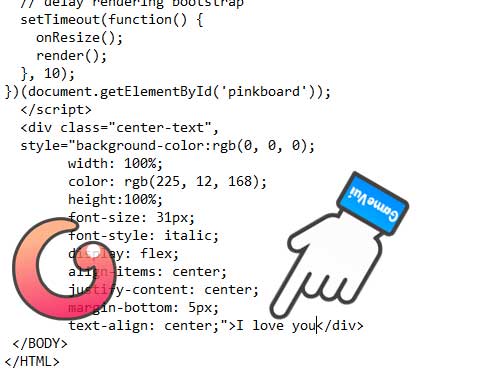
Bước 2: Bạn hãy tiến hành chỉnh sửa lại nội dung thông điệp theo ý của mình ở đoạn này nhé
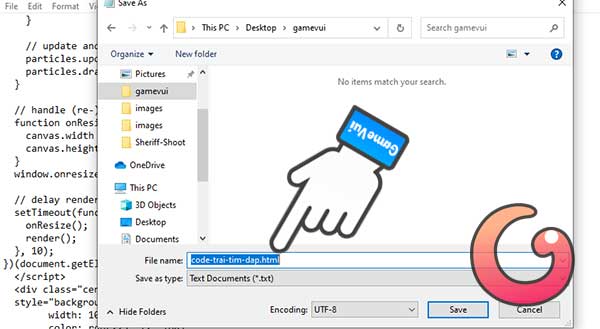
Bước 3: Sau khi chỉnh sửa xong thông điệp, bạn hãy nhấn vào mục File rồi chọn Save As và lưu file với đuôi html như dưới đây
Bước 4: Bạn tìm tới file html vừa lưu ở trên rồi mở ra bằng trình duyệt Chrome sẽ thấy kết quả như bên dưới
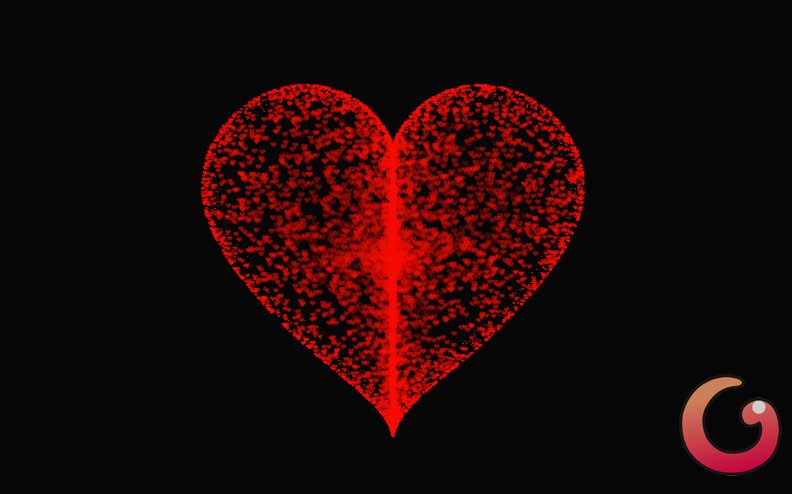
Code trái tim đỏ của thủ khoa Lý
Tải code trái tim đỏ html
Bên trên là code trái tim có chữ của thủ khoa Lý, ngoài ra, bạn có thể tải code trái tim màu đỏ của thủ khoa Lý dưới đây

<!DOCTYPE HTML PUBLIC “-//W3C//DTD HTML 4.0 Transitional//EN”> <HTML> <HEAD> <TITLE> Code trái tim đỏ GameVui </TITLE> <META NAME=”Generator” CONTENT=”EditPlus”> <META NAME=”Author” CONTENT=””> <META NAME=”Keywords” CONTENT=””> <META NAME=”Description” CONTENT=””> <meta charset=”utf-8″ /> <link rel=”stylesheet” href=”style.css”> <style> html, body { height: 100%; padding: 0; margin: 0; background: rgba(0, 0, 0, 0.851); } canvas { position: absolute; width: 100%; height: 100%; } </style> </HEAD> <BODY> <div class=”box”> <canvas id=”pinkboard”></canvas> </div> <script> var settings = { particles: { length: 10000, // maximum amount of particles duration: 4, // particle duration in sec velocity: 80, // particle velocity in pixels/sec effect: -1.3, // play with this for a nice effect size: 8, // particle size in pixels }, }; /* */ (function(){var b=0;var c=[“ms”,”moz”,”webkit”,”o”];for(var a=0;a<c.length&&!window.requestAnimationFrame;++a){window.requestAnimationFrame=window[c[a]+”RequestAnimationFrame”];window.cancelAnimationFrame=window[c[a]+”CancelAnimationFrame”]||window[c[a]+”CancelRequestAnimationFrame”]}if(!window.requestAnimationFrame){window.requestAnimationFrame=function(h,e){var d=new Date().getTime();var f=Math.max(0,16-(d-b));var g=window.setTimeout(function(){h(d+f)},f);b=d+f;return g}}if(!window.cancelAnimationFrame){window.cancelAnimationFrame=function(d){clearTimeout(d)}}}()); /* * Point class */ var Point = (function() { function Point(x, y) { this.x = (typeof x !== ‘undefined’) ? x : 0; this.y = (typeof y !== ‘undefined’) ? y : 0; } Point.prototype.clone = function() { return new Point(this.x, this.y); }; Point.prototype.length = function(length) { if (typeof length == ‘undefined’) return Math.sqrt(this.x * this.x + this.y * this.y); this.normalize(); this.x *= length; this.y *= length; return this; }; Point.prototype.normalize = function() { var length = this.length(); this.x /= length; this.y /= length; return this; }; return Point; })(); /* * Particle class */ var Particle = (function() { function Particle() { this.position = new Point(); this.velocity = new Point(); this.acceleration = new Point(); this.age = 0; } Particle.prototype.initialize = function(x, y, dx, dy) { this.position.x = x; this.position.y = y; this.velocity.x = dx; this.velocity.y = dy; this.acceleration.x = dx * settings.particles.effect; this.acceleration.y = dy * settings.particles.effect; this.age = 0; }; Particle.prototype.update = function(deltaTime) { this.position.x += this.velocity.x * deltaTime; this.position.y += this.velocity.y * deltaTime; this.velocity.x += this.acceleration.x * deltaTime; this.velocity.y += this.acceleration.y * deltaTime; this.age += deltaTime; }; Particle.prototype.draw = function(context, image) { function ease(t) { return (-t) * t * t + 1; } var size = image.width * ease(this.age / settings.particles.duration); context.globalAlpha = 1 – this.age / settings.particles.duration; context.drawImage(image, this.position.x – size / 2, this.position.y – size / 2, size, size); }; return Particle; })(); /* * ParticlePool class */ var ParticlePool = (function() { var particles, firstActive = 0, firstFree = 0, duration = settings.particles.duration; function ParticlePool(length) { // create and populate particle pool particles = new Array(length); for (var i = 0; i < particles.length; i++) particles[i] = new Particle(); } ParticlePool.prototype.add = function(x, y, dx, dy) { particles[firstFree].initialize(x, y, dx, dy); // handle circular queue firstFree++; if (firstFree == particles.length) firstFree = 0; if (firstActive == firstFree ) firstActive++; if (firstActive == particles.length) firstActive = 0; }; ParticlePool.prototype.update = function(deltaTime) { var i; // update active particles if (firstActive < firstFree) { for (i = firstActive; i < firstFree; i++) particles[i].update(deltaTime); } if (firstFree < firstActive) { for (i = firstActive; i < particles.length; i++) particles[i].update(deltaTime); for (i = 0; i < firstFree; i++) particles[i].update(deltaTime); } // remove inactive particles while (particles[firstActive].age >= duration && firstActive != firstFree) { firstActive++; if (firstActive == particles.length) firstActive = 0; } }; ParticlePool.prototype.draw = function(context, image) { // draw active particles if (firstActive < firstFree) { for (i = firstActive; i < firstFree; i++) particles[i].draw(context, image); } if (firstFree < firstActive) { for (i = firstActive; i < particles.length; i++) particles[i].draw(context, image); for (i = 0; i < firstFree; i++) particles[i].draw(context, image); } }; return ParticlePool; })(); /* * Putting it all together */ (function(canvas) { var context = canvas.getContext(‘2d’), particles = new ParticlePool(settings.particles.length), particleRate = settings.particles.length / settings.particles.duration, // particles/sec time; // get point on heart with -PI <= t <= PI function pointOnHeart(t) { return new Point( 160 * Math.pow(Math.sin(t), 3), 130 * Math.cos(t) – 50 * Math.cos(2 * t) – 20 * Math.cos(3 * t) – 10 * Math.cos(4 * t) + 25 ); } // creating the particle image using a dummy canvas var image = (function() { var canvas = document.createElement(‘canvas’), context = canvas.getContext(‘2d’); canvas.width = settings.particles.size; canvas.height = settings.particles.size; // helper function to create the path function to(t) { var point = pointOnHeart(t); point.x = settings.particles.size / 2 + point.x * settings.particles.size / 350; point.y = settings.particles.size / 2 – point.y * settings.particles.size / 350; return point; } // create the path context.beginPath(); var t = -Math.PI; var point = to(t); context.moveTo(point.x, point.y); while (t < Math.PI) { t += 0.01; // baby steps! point = to(t); context.lineTo(point.x, point.y); } context.closePath(); // create the fill context.fillStyle = ‘#f50b02’; context.fill(); // create the image var image = new Image(); image.src = canvas.toDataURL(); return image; })(); // render that thing! function render() { // next animation frame requestAnimationFrame(render); // update time var newTime = new Date().getTime() / 1000, deltaTime = newTime – (time || newTime); time = newTime; // clear canvas context.clearRect(0, 0, canvas.width, canvas.height); // create new particles var amount = particleRate * deltaTime; for (var i = 0; i < amount; i++) { var pos = pointOnHeart(Math.PI – 2 * Math.PI * Math.random()); var dir = pos.clone().length(settings.particles.velocity); particles.add(canvas.width / 2 + pos.x, canvas.height / 2 – pos.y, dir.x, -dir.y); } // update and draw particles particles.update(deltaTime); particles.draw(context, image); } // handle (re-)sizing of the canvas function onResize() { canvas.width = canvas.clientWidth; canvas.height = canvas.clientHeight; } window.onresize = onResize; // delay rendering bootstrap setTimeout(function() { onResize(); render(); }, 10); })(document.getElementById(‘pinkboard’)); </script> </BODY> </HTML>
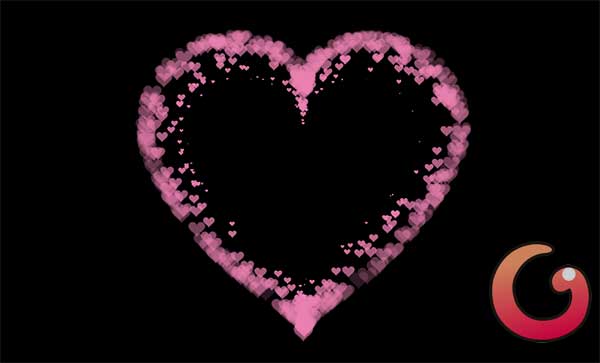
Code trái tim đập không có chữ của thủ khoa Lý
Tải code trái tim đập không có chữ html
Nếu không thích code trái tim đập có chữ thì bạn có thể chuyển sang dùng code trái tim đập không có chữ bên dưới
<!DOCTYPE HTML PUBLIC “-//W3C//DTD HTML 4.0 Transitional//EN”> <HTML> <HEAD> <meta charset=”utf-8″ /> <TITLE> Code trái tim không chữ GameVui </TITLE> <META NAME=”Generator” CONTENT=”EditPlus”> <META NAME=”Author” CONTENT=””> <META NAME=”Keywords” CONTENT=””> <META NAME=”Description” CONTENT=””> <style> html, body { height: 100%; padding: 0; margin: 0; background: #000; } canvas { position: absolute; width: 100%; height: 100%; } </style> </HEAD> <BODY> <canvas id=”pinkboard”></canvas> <script> /* * Settings */ var settings = { particles: { length: 500, // maximum amount of particles duration: 2, // particle duration in sec velocity: 100, // particle velocity in pixels/sec effect: -0.75, // play with this for a nice effect size: 30, // particle size in pixels }, }; /* * RequestAnimationFrame polyfill by Erik Möller */ (function(){var b=0;var c=[“ms”,”moz”,”webkit”,”o”];for(var a=0;a<c.length&&!window.requestAnimationFrame;++a){window.requestAnimationFrame=window[c[a]+”RequestAnimationFrame”];window.cancelAnimationFrame=window[c[a]+”CancelAnimationFrame”]||window[c[a]+”CancelRequestAnimationFrame”]}if(!window.requestAnimationFrame){window.requestAnimationFrame=function(h,e){var d=new Date().getTime();var f=Math.max(0,16-(d-b));var g=window.setTimeout(function(){h(d+f)},f);b=d+f;return g}}if(!window.cancelAnimationFrame){window.cancelAnimationFrame=function(d){clearTimeout(d)}}}()); /* * Point class */ var Point = (function() { function Point(x, y) { this.x = (typeof x !== ‘undefined’) ? x : 0; this.y = (typeof y !== ‘undefined’) ? y : 0; } Point.prototype.clone = function() { return new Point(this.x, this.y); }; Point.prototype.length = function(length) { if (typeof length == ‘undefined’) return Math.sqrt(this.x * this.x + this.y * this.y); this.normalize(); this.x *= length; this.y *= length; return this; }; Point.prototype.normalize = function() { var length = this.length(); this.x /= length; this.y /= length; return this; }; return Point; })(); /* * Particle class */ var Particle = (function() { function Particle() { this.position = new Point(); this.velocity = new Point(); this.acceleration = new Point(); this.age = 0; } Particle.prototype.initialize = function(x, y, dx, dy) { this.position.x = x; this.position.y = y; this.velocity.x = dx; this.velocity.y = dy; this.acceleration.x = dx * settings.particles.effect; this.acceleration.y = dy * settings.particles.effect; this.age = 0; }; Particle.prototype.update = function(deltaTime) { this.position.x += this.velocity.x * deltaTime; this.position.y += this.velocity.y * deltaTime; this.velocity.x += this.acceleration.x * deltaTime; this.velocity.y += this.acceleration.y * deltaTime; this.age += deltaTime; }; Particle.prototype.draw = function(context, image) { function ease(t) { return (-t) * t * t + 1; } var size = image.width * ease(this.age / settings.particles.duration); context.globalAlpha = 1 – this.age / settings.particles.duration; context.drawImage(image, this.position.x – size / 2, this.position.y – size / 2, size, size); }; return Particle; })(); /* * ParticlePool class */ var ParticlePool = (function() { var particles, firstActive = 0, firstFree = 0, duration = settings.particles.duration; function ParticlePool(length) { // create and populate particle pool particles = new Array(length); for (var i = 0; i < particles.length; i++) particles[i] = new Particle(); } ParticlePool.prototype.add = function(x, y, dx, dy) { particles[firstFree].initialize(x, y, dx, dy); // handle circular queue firstFree++; if (firstFree == particles.length) firstFree = 0; if (firstActive == firstFree ) firstActive++; if (firstActive == particles.length) firstActive = 0; }; ParticlePool.prototype.update = function(deltaTime) { var i; // update active particles if (firstActive < firstFree) { for (i = firstActive; i < firstFree; i++) particles[i].update(deltaTime); } if (firstFree < firstActive) { for (i = firstActive; i < particles.length; i++) particles[i].update(deltaTime); for (i = 0; i < firstFree; i++) particles[i].update(deltaTime); } // remove inactive particles while (particles[firstActive].age >= duration && firstActive != firstFree) { firstActive++; if (firstActive == particles.length) firstActive = 0; } }; ParticlePool.prototype.draw = function(context, image) { // draw active particles if (firstActive < firstFree) { for (i = firstActive; i < firstFree; i++) particles[i].draw(context, image); } if (firstFree < firstActive) { for (i = firstActive; i < particles.length; i++) particles[i].draw(context, image); for (i = 0; i < firstFree; i++) particles[i].draw(context, image); } }; return ParticlePool; })(); /* * Putting it all together */ (function(canvas) { var context = canvas.getContext(‘2d’), particles = new ParticlePool(settings.particles.length), particleRate = settings.particles.length / settings.particles.duration, // particles/sec time; // get point on heart with -PI <= t <= PI function pointOnHeart(t) { return new Point( 160 * Math.pow(Math.sin(t), 3), 130 * Math.cos(t) – 50 * Math.cos(2 * t) – 20 * Math.cos(3 * t) – 10 * Math.cos(4 * t) + 25 ); } // creating the particle image using a dummy canvas var image = (function() { var canvas = document.createElement(‘canvas’), context = canvas.getContext(‘2d’); canvas.width = settings.particles.size; canvas.height = settings.particles.size; // helper function to create the path function to(t) { var point = pointOnHeart(t); point.x = settings.particles.size / 2 + point.x * settings.particles.size / 350; point.y = settings.particles.size / 2 – point.y * settings.particles.size / 350; return point; } // create the path context.beginPath(); var t = -Math.PI; var point = to(t); context.moveTo(point.x, point.y); while (t < Math.PI) { t += 0.01; // baby steps! point = to(t); context.lineTo(point.x, point.y); } context.closePath(); // create the fill context.fillStyle = ‘#ea80b0’; context.fill(); // create the image var image = new Image(); image.src = canvas.toDataURL(); return image; })(); // render that thing! function render() { // next animation frame requestAnimationFrame(render); // update time var newTime = new Date().getTime() / 1000, deltaTime = newTime – (time || newTime); time = newTime; // clear canvas context.clearRect(0, 0, canvas.width, canvas.height); // create new particles var amount = particleRate * deltaTime; for (var i = 0; i < amount; i++) { var pos = pointOnHeart(Math.PI – 2 * Math.PI * Math.random()); var dir = pos.clone().length(settings.particles.velocity); particles.add(canvas.width / 2 + pos.x, canvas.height / 2 – pos.y, dir.x, -dir.y); } // update and draw particles particles.update(deltaTime); particles.draw(context, image); } // handle (re-)sizing of the canvas function onResize() { canvas.width = canvas.clientWidth; canvas.height = canvas.clientHeight; } window.onresize = onResize; // delay rendering bootstrap setTimeout(function() { onResize(); render(); }, 10); })(document.getElementById(‘pinkboard’)); </script> </BODY> </HTML>
Code trái tim thủ khoa Lý chèn hình ảnh
Tải code trái tìm chèn hình ảnh html
Bước 1: Bạn hãy tải file code trái tim theo đường link dưới đây
https://drive.google.com/file/d/1sOWvnQvfElynPpPWoqrDXTyoKW4m1RB9/view?usp=share_link
Bước 2: Sau khi tải về thành công, bạn hãy tiến hành giải nén tập tin vừa tải về (gồm 3 thư mục như bên dưới).
Bước 3: Bạn hãy sao chép ảnh muốn chèn vào thư mục vừa giải nén ở trên
Bước 4: Bây giờ, bạn hãy mở file index.html ở trên lên (bạn có thể cài Notepad++) để thực hiện chỉnh sửa cho phù hợp
Đầu tiên, bạn hãy tìm đến dòng <div class=”title”> sẽ thấy các mục
- STARDUST1: Năm mặc định là 2022 (bạn có thể đổi sang năm khác nếu muốn)
- STARDUST2: Bạn hãy thay bằng tên của mình và tên của nửa kia
- STARDUST3: Bạn hãy thay bằng thông điệp của mình
- <img class=”img”: Bạn hãy sao chép tên và định dạng ảnh vừa copy ở trên vào trong mục src:”…”
Cuối cùng ấn Ctrl+S để lưu lại và dùng trình duyệt Chrome mở file index.html lên là sẽ thấy.
Chúc các bạn thành công!

